Common Causes of Green Lines on iPhone Display
A bright green line suddenly appears on your iPhone screen. One moment it’s working perfectly — the next, it’s ruined.
This issue has become increasingly common on iPhone 12, 13, 14, and even 15 & 16 series. It’s not just annoying — it often signals serious hardware trouble.
In this section, we break down the top causes behind the dreaded green line so you can understand why it happened and what to do next.
Let’s dive in.
1. Understanding the iPhone Green Line Problem**
A sudden bright vertical green line appearing on your iPhone display can be shocking. One second your screen is perfect, and the next, there’s a distracting glowing stripe running from top to bottom.
This issue is known as the **iPhone Green Line Problem** — a hardware-related display failure that affects the OLED panel. The green line is caused when a row (or column) of pixels gets stuck or loses proper connection, lighting up permanently in green. It rarely goes away on its own and often gets worse over time.
Why Does It Appear Suddenly?
The green line usually doesn’t happen overnight without a trigger. It can appear after:
- A software update
- Exposure to heat
- Minor drops
- Normal daily usage over 1–2 years
Even without visible damage, internal connections in the display can fail gradually.
Which iPhone Models Are Most Affected?
The problem is most common on **OLED iPhones** (starting from iPhone X onwards). Highest number of complaints come from:
- iPhone 12 series
- iPhone 13 series (especially 13 & 13 Pro)
- iPhone 14 series
- iPhone 15 & 15 Pro models
- iPhone 16 series (early reports)
While it can technically occur on any OLED iPhone, the Pro models tend to show it more due to higher brightness usage and advanced display technology.
This is not a software bug in most cases — it is a hardware failure involving the display panel, flex cable, or internal connections. Understanding this early helps you decide between quick fixes and proper repair.
If you’re seeing this line right now, you’re not alone — and you have options. Keep reading to find out exactly why it happens and how to fix it fast.
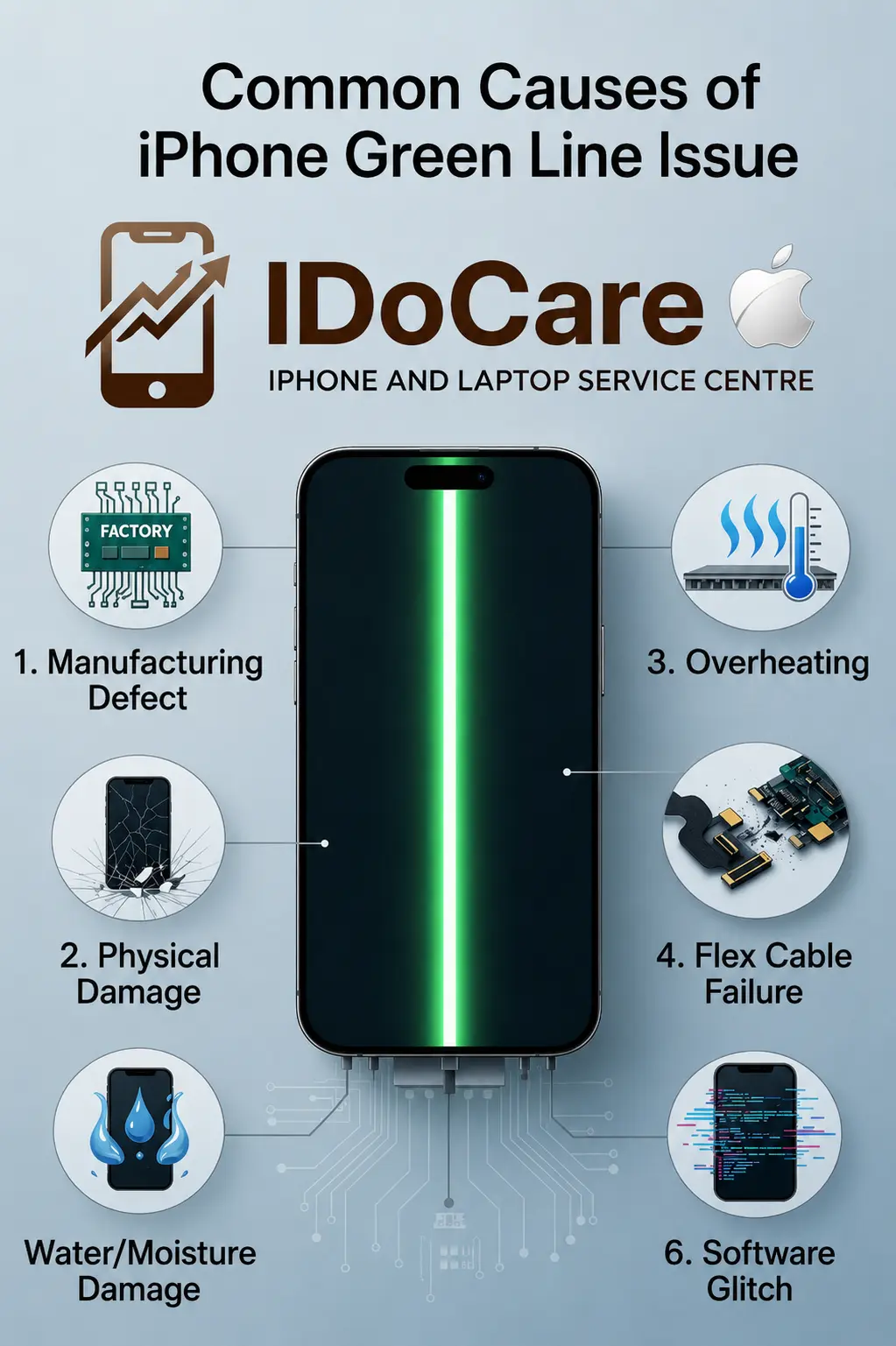
1. Manufacturing Defect
Many cases trace back to factory-level issues. During production, tiny flaws in the OLED panel or bonding between the display layers can create weak points. Over time, these weak connections fail, causing a permanent green line. Apple has acknowledged similar display issues in the past through repair programs, especially on iPhone 12 and 13 series.
2. Physical Damage (Even Minor Drops)
A drop doesn’t need to crack the glass to cause internal damage. Impact can loosen or damage the display flex cable — the thin ribbon that connects the screen to the logic board. Even a small bump in a pocket or bag can trigger this.
3. Overheating
Excessive heat is one of the biggest culprits. Using your iPhone while charging, in direct sunlight, or running heavy apps (like gaming or video recording) raises internal temperatures. Heat weakens the adhesive and connections inside the display, leading to pixel line failure.
4. Flex Cable Failure
The display flex cable is delicate. Repeated bending, pressure from tight cases, or normal wear can cause it to tear or lose contact. This is very common in iPhones that are frequently opened and closed or used heavily.
5. Water or Moisture Damage
Even if your iPhone isn’t fully submerged, humidity, sweat, or accidental splashes can seep into the display assembly. Moisture corrodes the tiny circuits responsible for controlling individual pixel rows, resulting in stuck green lines.
6. Software Glitch (Rare)
While most green line cases are hardware-related, a few users report the line appearing after a major iOS update. In such cases, a factory reset or iOS downgrade sometimes helps temporarily. However, if the line remains after restarting, it is almost always a hardware issue.
Summary of Common Causes
|
Cause |
Description |
Likelihood |
Common Triggers |
|
Manufacturing Defect |
Weak connections in OLED panel from factory |
High |
Appears suddenly after 1–2 years |
|
Physical Damage |
Impact damaging flex cable or display |
High |
Drops, pressure, bumps |
|
Overheating |
Heat weakens internal display connections |
Very High |
Charging + heavy use, hot environment |
|
Flex Cable Failure |
Ribbon cable tears or loses contact |
Very High |
Daily use, tight cases, frequent opening |
|
Water/Moisture Damage |
Corrosion due to liquid exposure |
Medium |
Sweat, humidity, accidental splash |
|
Software Glitch |
Temporary display rendering issue |
Low |
After iOS updates |
FAQ – iPhone Green Line Issue
Here are the most frequently asked questions about the iPhone green line problem:
Q1. Is the green line on iPhone a software or hardware issue? Mostly hardware. While rare software glitches can cause temporary lines, a permanent bright green line is almost always due to display hardware failure (OLED panel, flex cable, or connection issues).
Q2. Will the green line go away on its own? No. Once it appears, it usually stays or gets worse. Temporary tricks like restart or dark mode may reduce visibility slightly, but they don’t fix the root cause.
Q3. Does Apple replace the screen for free under warranty? It depends. If your iPhone is under standard 1-year warranty or AppleCare+, and there’s no physical damage or liquid exposure, Apple may cover the repair. However, many users report Apple denying coverage calling it “accidental damage.” Always visit an Apple Store for diagnosis.
Q4. How much does green line repair cost?
- Official Apple Screen Replacement: ₹18,900 – ₹45,000+ (depending on model)
- Third-party professional repair: ₹8,500 – ₹18,000 (much cheaper but varies in quality) Full logic board repair is rarely needed and very expensive.
Q5. Can I fix the green line myself? Not recommended. DIY screen replacement is possible but risky — you can easily damage the flex cable further or worsen the issue. Professional repair is safer.
Why Choose Ido Care for iPhone Green Line Repair?
- At Ido Care, we specialize in solving complex iPhone display issues, including the notorious green line problem. With over 8 years of hands-on experience in premium smartphone repairs in Bengaluru, our team has successfully fixed thousands of iPhones 12, 13, 14, 15, and 16 series devices suffering from OLED green line issues.
- Our technicians are factory-trained and use high-quality original-grade OLED panels and flex cables. We understand the root causes — whether it’s flex cable failure, manufacturing defects, or overheating damage — and provide precise, long-lasting repairs.
- Why Ido Care Stands Out:
- ✅ Expert diagnosis of green line & display failures
- ✅ Original & Premium OEM screen replacements
- ✅ Same-day repair service available
- ✅ Free pickup & drop in Bengaluru
- ✅ 90-day warranty on all screen repairs
- ✅ Transparent pricing with no hidden charges
- Don’t let a green line ruin your iPhone experience. Trust the experts who repair more green line cases than anyone else in the city.
- Book Your iPhone Green Line Repair Now