Nothing Series Device Models
Select your specific device model for repair services
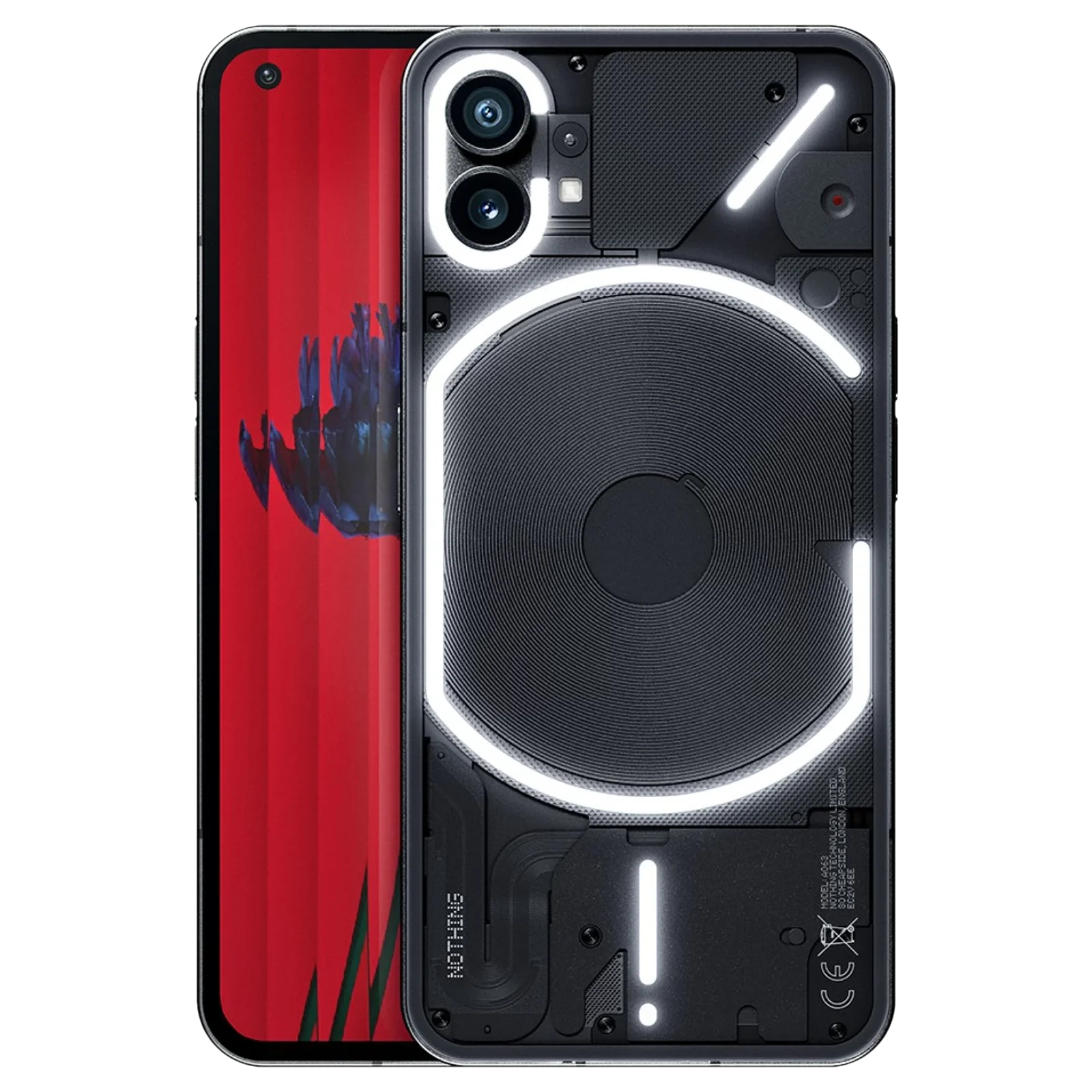
Nothing Phone (1)
Nothing Phone (1) Repair in Bangalore
Looking for Nothing Phone (1) repair in Bangalore? iDoCare provides diagnostic and repair services for Nothing Phone (1) smartphones experiencing cracked screens, battery drain, charging problems, camera faults, Glyph Interface issues, and other hardware or software failures.
The Nothing Phone (1) features a 6.55-inch 120Hz OLED display, a transparent-style rear design with a distinctive Glyph Interface, dual rear cameras, and 5G connectivity. Damage to the display, battery, charging port, camera system, or Glyph lighting can affect everyday use. A proper diagnosis helps identify the actual fault and determine whether a component replacement, software troubleshooting, or board-level repair is appropriate.
iDoCare follows a diagnosis-first approach, assessing the reported symptoms and explaining suitable repair options before work begins. Repair cost and turnaround time depend on the device's condition, the complexity of the fault, and compatible replacement-part availability.
Nothing Phone (1) Repair Services
| Common problem | Recommended repair or diagnosis |
|---|---|
| Cracked or damaged OLED screen | Display inspection and screen replacement |
| Touchscreen not responding | Touch and display assembly diagnosis |
| Battery drains quickly | Battery health and power-consumption assessment |
| Phone does not charge | USB-C port and charging-circuit inspection |
| Camera produces blurry images | Camera module and focus diagnosis |
| Glyph lights do not work properly | Glyph Interface and related connection diagnosis |
| Speaker or microphone malfunction | Audio component testing |
| Wi-Fi, Bluetooth, or mobile network problems | Connectivity and antenna diagnosis |
| Phone overheats or restarts | Battery, software, and hardware assessment |
| Phone does not switch on | Power-system and motherboard diagnosis |
| Liquid exposure | Internal inspection and corrosion assessment |
Nothing Phone (1) Display Replacement
The Nothing Phone (1) uses an OLED display with a 120Hz refresh rate. A drop, impact, or excessive pressure can damage the screen, causing cracked glass, black patches, coloured lines, flickering, dead pixels, or unresponsive touch controls.
A professional inspection helps determine whether the display assembly needs replacement or whether the issue involves an internal connector or another component.
Display repair services may include:
-
Cracked or shattered screen replacement
-
Touchscreen response diagnosis
-
Black-screen and flickering troubleshooting
-
Display connector inspection
-
Post-repair checks for brightness, touch response, and display functionality
The replacement option and repair cost depend on compatible screen availability and the extent of damage. Confirm the part specification and estimate before approving the repair.
Nothing Phone (1) Battery Replacement
If your Nothing Phone (1) loses charge quickly, shuts down unexpectedly, or struggles to maintain battery life, the battery may have deteriorated. Background applications, software issues, and charging-system faults can also cause similar symptoms.
Battery-related services may include:
-
Battery condition assessment
-
Rapid battery-drain diagnosis
-
Investigation of unexpected shutdowns
-
Charging and power-system checks
-
Battery replacement when required
If the battery appears swollen or the phone becomes unusually hot, stop using and charging it and arrange a professional inspection. Do not puncture, press, or attempt to remove the battery yourself.
Nothing Phone (1) Charging Port Repair
Charging problems may result from a damaged USB-C port, debris in the connector, a faulty cable, liquid exposure, or a fault in the charging circuit. Since the Nothing Phone (1) supports wired and wireless charging, checking the symptoms can help narrow down the cause.
iDoCare can assess issues such as:
-
Phone not detecting the wired charger
-
Charging that starts and stops intermittently
-
Loose or damaged USB-C connection
-
Slow or inconsistent charging
-
USB data connection problems
-
Charging failure following liquid exposure
The charging port should be inspected before replacement is recommended. Avoid inserting metal objects into the connector or charging the phone if liquid damage is suspected.
Nothing Phone (1) Camera Repair
The Nothing Phone (1) features dual 50MP rear cameras, including a main camera with optical image stabilisation. If your phone produces blurry photos, struggles to focus, displays a black camera preview, or develops camera problems after an impact, the cause may involve the camera module, lens area, connector, or software.
Camera diagnosis may cover:
-
Front-camera and rear-camera troubleshooting
-
Blurry images and autofocus problems
-
Camera application crashes or black previews
-
Damaged camera glass or lens area
-
Camera module and connector inspection
-
Photo and video testing after repair
A proper diagnosis helps establish whether the camera module requires replacement or whether another fault is responsible.
Nothing Phone (1) Glyph Interface Repair
The Glyph Interface is one of the distinctive features of the Nothing Phone (1). Its rear lighting patterns can be used for notifications, calls, charging indications, and supported features. If some lights stop working or the lighting behaves unexpectedly, the issue may relate to settings, software, connections, or internal hardware.
Glyph-related diagnosis may include:
-
Glyph lighting not illuminating
-
Some lighting sections not working
-
Notification-light behaviour problems
-
Charging-indicator lighting issues
-
Glyph settings and software troubleshooting
-
Inspection of related connectors and internal components
Not every Glyph issue requires hardware replacement. Software settings and functionality should be checked before recommending internal repair.
Speaker, Microphone and Connectivity Repair
Audio and connectivity faults can affect calls, recordings, messaging, and daily smartphone use. Low speaker volume, distorted sound, microphone failure, unstable Wi-Fi, Bluetooth pairing problems, or weak mobile reception may be caused by component damage, obstruction, software errors, or internal connection problems.
Possible services include:
-
Earpiece and loudspeaker diagnosis
-
Microphone testing
-
Call-audio and recording checks
-
SIM detection and mobile network troubleshooting
-
Wi-Fi and Bluetooth diagnosis
-
Antenna and internal connector inspection
Testing helps identify the affected component and determine the appropriate repair without unnecessary replacement.
Nothing Phone (1) Software and Motherboard Repair
Freezing, repeated restarts, startup failure, or a phone that will not switch on may indicate a software problem, battery fault, power-system issue, or motherboard damage.
iDoCare can assess problems involving:
-
Boot and startup failures
-
Repeated restarting and system instability
-
Software errors and application crashes
-
Charging and power-management faults
-
Liquid-related internal damage
-
Motherboard component faults, where repair is technically feasible
Some problems may be resolved through software troubleshooting, while others require hardware-level diagnosis. Component-level motherboard repair depends on the location and severity of the damage.
Data protection: If your phone contains important photos, documents, or business files, discuss data-preservation options before authorising a factory reset, software reinstallation, or motherboard repair. Data recovery cannot be guaranteed, and some procedures may result in data loss.
Nothing Phone (1) Repair Cost in Bangalore
The cost of Nothing Phone (1) repair in Bangalore depends on the affected component, the extent of damage, the availability of compatible parts, and the labour required.
| Repair category | Factors affecting the cost |
|---|---|
| OLED display replacement | Display specification, availability, and impact damage |
| Battery replacement | Battery compatibility and related power-system faults |
| Charging port repair | Port condition and charging-circuit damage |
| Camera repair | Camera module, lens-area damage, and connector condition |
| Glyph Interface repair | Affected lighting section, connections, and hardware condition |
| Speaker or microphone repair | Faulty component and additional internal damage |
| Software troubleshooting | Nature of the software issue and work required |
| Motherboard repair | Fault location, component-level feasibility, and complexity |
| Liquid-damage repair | Corrosion severity and affected components |
An accurate estimate should be provided after inspecting the device. Before approving a repair, confirm the proposed work, compatible component options, expected turnaround time, and applicable warranty terms.
Why Choose iDoCare for Nothing Phone (1) Repair?
A reliable repair service should identify the actual problem, explain suitable solutions, and test the device after the work is completed.
iDoCare's repair approach focuses on:
-
Diagnosis before replacement: Investigating the underlying cause of the reported fault.
-
Model-specific assessment: Considering the OLED display, Glyph Interface, camera system, and internal components.
-
Clear repair recommendations: Explaining the proposed work and relevant cost factors.
-
Functional testing: Checking the repaired feature and related functions where applicable.
-
Data-conscious handling: Discussing data risks before software or motherboard procedures.
-
Transparent repair terms: Clarifying parts availability, repair limitations, and applicable warranty conditions.
Repair feasibility depends on the phone's condition, the nature of the fault, and the availability of suitable parts.
What to Do Before Repairing Your Nothing Phone (1)
Follow these precautions before arranging a repair:
-
Back up important data if the phone is accessible and functioning.
-
Note when the problem started and whether it followed a drop, liquid exposure, or software update.
-
Test a known-working charging cable and adapter if charging can be attempted safely.
-
Avoid charging a phone that is unusually hot or suspected of liquid damage.
-
Do not attempt to open the phone or remove its battery without appropriate equipment and expertise.
-
Ask about repair scope, parts, data handling, functional testing, and warranty terms before approving service.
Nothing Phone (1) Service in Bangalore
For Nothing Phone (1) screen replacement, battery service, charging port repair, Glyph Interface troubleshooting, camera repair, and motherboard diagnosis in Bangalore, iDoCare offers repair assessment based on the symptoms and condition of your device.
Whether your Nothing Phone (1) has a damaged OLED screen, reduced battery life, charging difficulties, faulty Glyph lights, or a more complex hardware issue, begin with a professional diagnosis. Identifying the actual fault helps determine the most appropriate repair rather than replacing components unnecessarily.
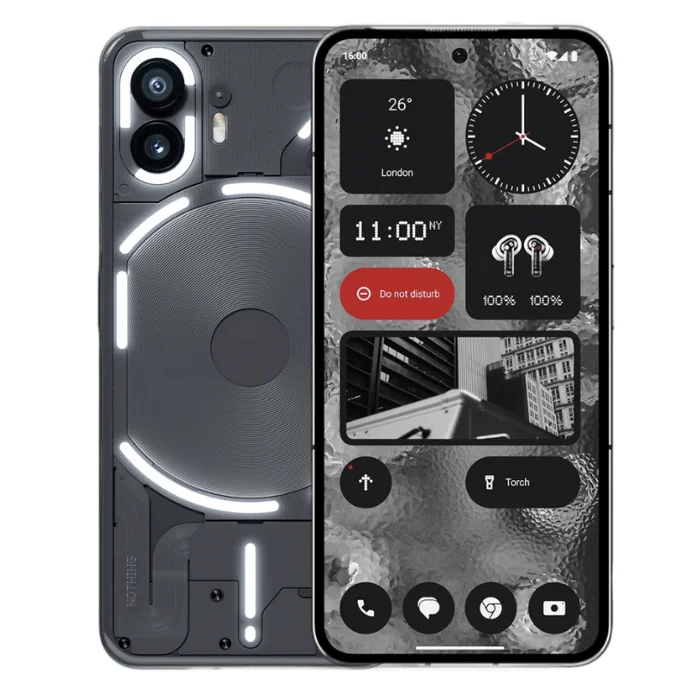
Nothing Phone (2) 5G
Nothing Phone (2) 5G Repair Services at iDoCare
Nothing Phone (2) 5G repair in Bangalore requires device-specific troubleshooting for its LTPO AMOLED display, battery, charging system, cameras, Glyph Interface and internal hardware. iDoCare provides diagnostic-based repair services for Nothing Phone (2) 5G users experiencing screen damage, battery drain, charging problems, camera faults, software issues and other hardware concerns.
The Nothing Phone (2) features a 6.7-inch LTPO OLED display with an adaptive refresh rate of up to 120Hz, a dual rear camera system, a 4,700mAh battery and a distinctive Glyph Interface. Repairing these components requires the correct parts, careful handling and testing appropriate to the reported fault.
Whether your phone has a cracked screen, drains battery quickly, fails to charge properly or experiences unexpected shutdowns, the appropriate repair depends on the device's condition and the results of a technical inspection.
Common Nothing Phone (2) 5G Problems and Repair Solutions
| Common issue | Possible repair or diagnosis |
|---|---|
| Cracked or damaged screen | Display assembly inspection and replacement, if required |
| Battery draining quickly | Battery health, app usage and power-consumption checks |
| Phone not charging | USB-C port, cable, adapter and charging-circuit diagnosis |
| Glyph lights not working | Glyph settings, software and hardware inspection |
| Blurry or faulty camera | Camera module, lens and software checks |
| Speaker or microphone problems | Audio component and connection testing |
| Wi-Fi, Bluetooth or network issues | Settings, software and hardware diagnosis |
| Phone overheating | Battery, charging, application and internal hardware checks |
| Phone restarting or not powering on | Software, battery and motherboard diagnosis |
| Liquid exposure | Internal inspection and corrosion assessment |
Nothing Phone (2) Screen Replacement
The Nothing Phone (2) uses a 6.7-inch LTPO OLED display designed for smooth scrolling, rich colours and adaptive refresh rates. A drop or impact can cause cracks, black spots, flickering, touch failure or display lines.
iDoCare can inspect the screen and determine whether a display replacement is necessary. If the display is damaged, the replacement option should be selected according to compatibility, quality and availability.
Before approving the repair, ask about the replacement part, expected repair time and applicable warranty terms. After repair, the display should be checked for touch response, brightness, colour consistency and refresh-rate behaviour where supported.
Nothing Phone (2) Battery Replacement
Battery drain, unexpected shutdowns, slow charging and reduced battery backup can affect everyday use. These symptoms do not always mean the battery needs replacement; software activity, charging accessories and other hardware faults can also contribute.
A suitable battery diagnosis should consider:
-
Battery backup and charging behaviour.
-
Unexpected shutdowns or irregular battery percentage changes.
-
Excessive heat during charging or normal use.
-
Battery swelling or physical deformation.
-
Power consumption caused by applications or system processes.
If the battery is degraded or damaged, iDoCare can assess the replacement requirements for the Nothing Phone (2). A swollen battery should not be pressed, punctured or used further; arrange professional inspection.
Nothing Phone (2) Charging Port Repair
If your Nothing Phone (2) 5G charges intermittently, connects only at a particular cable angle or does not recognise the charger, the cause may be debris, cable damage, a worn USB-C port or a charging-circuit fault.
A proper inspection should distinguish between an accessory issue and a device-side problem. Depending on the findings, the repair may involve port servicing, charging-port replacement or further board-level diagnosis.
Avoid forcing the cable into the port or inserting sharp objects to remove debris, as these actions can damage the connector.
Nothing Phone (2) Glyph Interface Repair
The Glyph Interface is a distinctive feature of the Nothing Phone (2), using rear lighting patterns for notifications and other supported functions. If the lights fail, behave inconsistently or stop responding, the issue may relate to settings, software, a connection or the lighting hardware.
Repair diagnosis may include:
-
Checking Glyph settings and supported features.
-
Testing whether the issue occurs across different functions.
-
Inspecting the rear lighting components after physical damage.
-
Assessing internal connections or related hardware when necessary.
The exact repair depends on the affected component and the availability of compatible replacement parts.
Nothing Phone (2) Camera Repair
The Nothing Phone (2) has a dual rear camera system and a front-facing camera for photography, video calls and content creation. Camera problems may appear as blurry images, focus failure, camera app crashes, unusual spots or a black preview screen.
Potential repair steps include checking the camera application, inspecting the lens for damage, testing camera modules and evaluating related connections. If a camera component has failed, replacement may be recommended after diagnosis.
A damaged lens cover should be assessed promptly because dust or moisture entering the camera area may cause further problems.
Speaker, Microphone and Connectivity Repair
Low call volume, distorted sound, microphone failure, Bluetooth disconnections and Wi-Fi problems can arise from settings, software, blocked openings or hardware damage.
iDoCare can assess reported audio and connectivity faults to identify the likely cause before recommending a repair. Testing should cover the affected function and, where relevant, calls, media playback, microphone input and wireless connections.
Nothing Phone (2) Software and Motherboard Diagnosis
If your phone freezes, repeatedly restarts, fails to boot or becomes unresponsive, the problem may involve software corruption, battery instability or internal hardware.
A sensible diagnostic process begins with basic software and power checks before moving to more complex repairs. Where the symptoms suggest a motherboard or charging-circuit fault, further technical inspection may be necessary.
If your phone contains important photos, documents or business data, explain your data-preservation priority before authorising a repair. Data recovery is not guaranteed, particularly when storage components are damaged. Avoid factory resetting the device or flashing firmware before considering data-preservation options.
Nothing Phone (2) Repair Cost in Bangalore
The cost of Nothing Phone (2) 5G repair depends on the damaged component, part quality, labour, device condition and whether additional faults are discovered during inspection.
| Repair category | Factors affecting the cost |
|---|---|
| OLED display replacement | Display assembly quality and extent of damage |
| Battery replacement | Compatible battery availability and installation requirements |
| Charging port repair | Port condition and possible charging-circuit damage |
| Glyph Interface repair | Affected lighting component and internal connections |
| Camera repair | Camera module, lens or related hardware fault |
| Speaker or microphone repair | Component failure and related circuit condition |
| Motherboard repair | Fault location, component-level work and repair complexity |
| Liquid damage assessment | Corrosion severity and the number of affected components |
An accurate estimate should be provided after the device has been inspected. Confirm the parts being used, the final scope of work and warranty coverage before approving the repair.
Why Choose iDoCare for Nothing Phone (2) Repair?
Choosing a repair provider that understands the device's hardware and software can help reduce unnecessary part replacement and improve repair transparency.
At iDoCare, the repair process should focus on:
-
Diagnosis before repair: Identify the likely cause instead of replacing components without assessment.
-
Model-specific troubleshooting: Consider the LTPO OLED display, Glyph Interface, camera system, battery and charging hardware.
-
Clear repair recommendations: Explain the identified fault and available repair options.
-
Data-conscious handling: Discuss backup and data-preservation requirements before software or motherboard work.
-
Post-repair checks: Test the repaired function and related components where practical.
-
Transparent warranty terms: Confirm applicable coverage for the replacement part and repair before proceeding.
Repair outcomes depend on the phone's condition, the confirmed fault and compatible part availability. Water resistance, where relevant, should not be assumed to remain unchanged after the device has been opened or repaired.
Before Bringing Your Nothing Phone (2) for Repair
Back up your data if the device is working and a backup is possible. Note the symptoms, when they started and whether the phone has suffered a drop, liquid exposure or recent software update.
If the phone becomes unusually hot, shows battery swelling or has suffered liquid exposure, stop charging it and seek professional assessment. Do not attempt to open the device yourself.
For software-related issues, avoid a factory reset until you understand the potential impact on your data. If the device is still operational, keep important files backed up and make sure you understand any data-access requirements before handing it over for service.
Nothing Phone (2) 5G Repair in Bangalore – Final Overview
For Nothing Phone (2) 5G repair in Bangalore, iDoCare can assess display damage, battery performance, charging faults, Glyph Interface problems, camera issues, audio faults and selected internal hardware concerns. A diagnosis-led approach helps identify the appropriate repair rather than relying on symptoms alone.
Whether the problem involves a cracked OLED screen, poor battery backup, a faulty USB-C connection or a phone that will not power on, the next step is to establish the cause, confirm part availability and understand the estimated cost before proceeding.
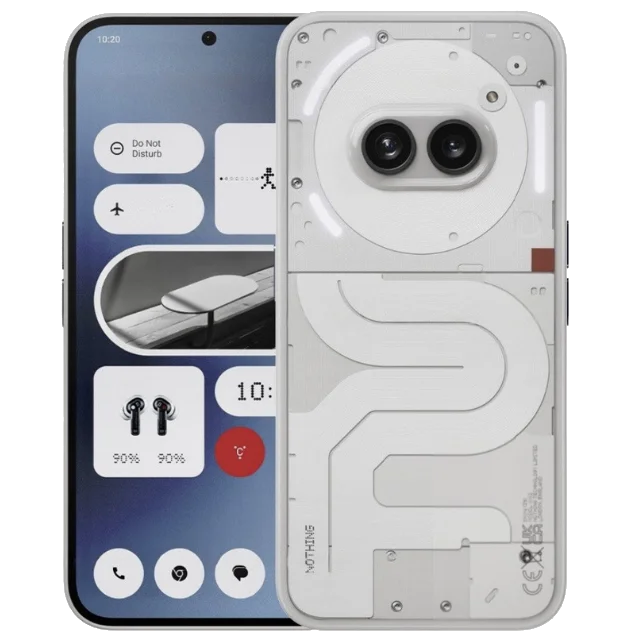
Nothing Phone (2a)
Nothing Phone (2a) Repair Services at iDoCare
Nothing Phone (2a) repair in Bangalore requires accurate diagnosis of the phone's AMOLED display, battery, charging system, cameras, Glyph Interface and internal hardware. iDoCare provides diagnostic-based repair services for Nothing Phone (2a) users experiencing cracked screens, battery drain, charging issues, camera problems, software faults and other hardware concerns.
The Nothing Phone (2a) features a 6.7-inch AMOLED display with a 120Hz refresh rate, a MediaTek Dimensity 7200 Pro processor, a dual rear camera system and the distinctive Glyph Interface. Damage to these components can affect display quality, daily performance, photography, charging and notifications.
Whether your phone has suffered accidental damage, overheats during use, charges intermittently or fails to turn on, the right repair begins with identifying the underlying cause. iDoCare can assess the reported symptoms and recommend an appropriate repair based on the device's condition and compatible part availability.
Common Nothing Phone (2a) Problems and Repair Solutions
| Phone problem | Possible repair or diagnostic approach |
|---|---|
| Cracked screen or touch failure | AMOLED display inspection and replacement if necessary |
| Battery draining quickly | Battery health and power-consumption checks |
| Phone not charging | USB-C port, charging accessories and circuit diagnosis |
| Glyph lights not working | Software settings, lighting components and connection checks |
| Blurry or malfunctioning camera | Lens, camera module and software inspection |
| Speaker or microphone issues | Audio component testing and connection checks |
| Wi-Fi or Bluetooth problems | Software, settings and hardware diagnosis |
| Overheating or unexpected shutdowns | Battery, charging, application and hardware assessment |
| Phone stuck on logo or restarting | Software troubleshooting and internal hardware diagnosis |
| Liquid damage | Internal inspection and corrosion assessment |
Nothing Phone (2a) Screen Replacement
The Nothing Phone (2a) uses a 6.7-inch AMOLED display with a 120Hz refresh rate for smooth scrolling and clear visuals. A drop or impact can cause cracked glass, display lines, black spots, flickering, dead pixels or unresponsive touch controls.
iDoCare can inspect the display to determine whether the problem is limited to the screen assembly or involves other internal components. If replacement is required, the suitable option depends on compatibility, part quality and availability.
After a display repair, relevant checks should include touch responsiveness, brightness, colour output and screen stability. Customers should confirm the replacement part specifications and applicable warranty terms before approving the work.
Nothing Phone (2a) Battery Replacement
Fast battery drain, inconsistent battery percentages, unexpected shutdowns and reduced backup can make the Nothing Phone (2a) difficult to use throughout the day.
These symptoms may result from battery degradation, background applications, software issues or charging-system faults. Replacing the battery without checking the cause may not resolve every power-related problem.
A battery assessment can consider:
-
Battery backup and charging behaviour.
-
Sudden drops in battery percentage.
-
Unexpected shutdowns under normal use.
-
Unusual heating during charging or everyday tasks.
-
Battery swelling or physical deformation.
If the battery is degraded or damaged, iDoCare can assess the replacement requirements. A swollen battery should not be pressed, punctured or charged; arrange professional inspection.
Nothing Phone (2a) Charging Port Repair
If the Nothing Phone (2a) does not charge, connects intermittently or only charges when the cable is held at a particular angle, the fault may involve the cable, adapter, USB-C port or charging circuitry.
A proper diagnosis should distinguish between an accessory problem and a device-side fault. Depending on the findings, the required service may involve port cleaning, connector replacement or further board-level inspection.
Avoid forcing the charging cable into the phone or using sharp objects to remove debris. These actions can damage the port and make the repair more complicated.
Nothing Phone (2a) Glyph Interface Repair
The Glyph Interface is a distinctive feature of the Nothing Phone (2a), using rear lighting patterns for supported notifications and functions. If the lights stop working, behave inconsistently or fail after a drop, the issue may involve settings, software, internal connections or the lighting hardware.
The diagnostic process may include:
-
Checking Glyph settings and supported features.
-
Testing whether the issue affects all lighting functions or only specific patterns.
-
Inspecting the rear lighting components for impact damage.
-
Assessing internal connections or related hardware when necessary.
The appropriate repair depends on the affected component and the availability of compatible parts.
Nothing Phone (2a) Camera Repair
The Nothing Phone (2a) includes a dual rear camera system for everyday photography and video recording. Camera faults can appear as blurry pictures, focus problems, a black preview screen, unusual spots or camera app crashes.
The cause may be software-related, a damaged lens, a faulty camera module or an internal connection issue. A diagnosis should identify the affected component before replacement is recommended.
If the camera glass is cracked, arrange an inspection to reduce the risk of dust or moisture reaching the camera assembly.
Speaker, Microphone and Connectivity Repair
Low call volume, distorted audio, microphone failure, Bluetooth disconnections and Wi-Fi connectivity problems can affect calls, streaming and everyday communication.
These issues may be caused by settings, software, blocked openings or damaged hardware. iDoCare can assess the reported fault and recommend suitable troubleshooting or component-level repair where appropriate.
Testing may include call audio, microphone input, media playback and the affected wireless connection. The final repair depends on the diagnostic results.
Nothing Phone (2a) Software and Motherboard Repair
A Nothing Phone (2a) that freezes, restarts repeatedly, becomes stuck on the startup logo or refuses to power on may have a software, battery or internal hardware problem.
A sensible repair process starts with basic software and power checks before proceeding to more complex diagnosis. If symptoms indicate a charging-circuit or motherboard fault, further inspection may be needed to identify the affected component.
If the phone contains important photographs, documents or business data, explain your data-preservation priority before authorising software or motherboard work. Data recovery cannot be guaranteed, particularly when storage components are damaged. Avoid a factory reset or firmware flashing before considering data-preservation options.
Nothing Phone (2a) Repair Cost in Bangalore
The cost of Nothing Phone (2a) repair depends on the damaged component, part quality, labour, device condition and whether additional faults are found during inspection.
| Repair type | What can affect the cost |
|---|---|
| AMOLED display replacement | Display assembly quality and extent of damage |
| Battery replacement | Compatible battery availability and installation requirements |
| Charging port repair | Port condition and possible charging-circuit damage |
| Glyph Interface repair | Lighting component and internal connection faults |
| Camera repair | Camera module, lens or related hardware damage |
| Speaker or microphone repair | Component failure and associated circuit condition |
| Motherboard repair | Fault location and complexity of component-level work |
| Liquid damage assessment | Corrosion severity and number of affected components |
An accurate estimate should be provided after diagnosis. Before approving the repair, confirm the replacement part, estimated cost, expected turnaround and applicable warranty terms.
Why Choose iDoCare for Nothing Phone (2a) Repair?
A reliable repair process should focus on identifying the fault, explaining the available options and testing the affected functions after the work is completed.
iDoCare's diagnostic-based approach focuses on:
-
Device-specific assessment: Consider the AMOLED display, Glyph Interface, camera system, battery and charging hardware.
-
Diagnosis before replacement: Investigate the cause instead of assuming every symptom requires a new component.
-
Clear repair recommendations: Explain the identified issue and the proposed solution.
-
Data-conscious handling: Discuss backup and data-preservation requirements before software or motherboard work.
-
Post-repair testing: Check the repaired function and related components where practical.
-
Transparent warranty terms: Confirm the applicable coverage for the repair and replacement parts.
Repair outcomes depend on the device's condition, the confirmed fault and compatible part availability. Water resistance should not be assumed to remain unchanged after the phone has been opened or repaired.
What to Do Before Repairing Your Nothing Phone (2a)
Before bringing your phone for service, back up important data if the device is operational. Note when the problem started and whether it followed a drop, liquid exposure, charging incident or software update.
If the phone becomes unusually hot, shows signs of battery swelling or has suffered liquid exposure, stop charging it and seek professional assessment. Do not attempt to open the device yourself.
For software-related faults, avoid factory resetting the phone until you understand the potential impact on stored data. If the device still works, keep important files backed up and clarify any data-access requirements before service.
Nothing Phone (2a) Repair in Bangalore – Final Overview
For Nothing Phone (2a) repair in Bangalore, iDoCare can assess screen damage, battery problems, charging faults, Glyph Interface issues, camera malfunctions, audio concerns and selected internal hardware faults.
Whether the problem involves a cracked AMOLED display, poor battery backup, a faulty USB-C connection or a phone that will not power on, a diagnosis-led approach helps identify the appropriate next step. Confirm the repair scope, compatible part availability and estimated cost before proceeding.